
From Production Orders to What Runs Next
- Step 1ERP / Excel / Shop UpdatesOrders, routings, machines, shifts and progress from a supported ERP, structured files or end-of-day paper-traveler updates.
- Step 2Skody ScheduleA finite-capacity sequence across eligible machines, built around feasible capacity and customer due dates.
- Step 3Shop-Floor Execution QueueThe next operations by machine or by operator, with priority, status and delivery risk.
- Skody reads orders, routings, machines, shifts and relevant production constraints, such as setups, tooling, materials and outside processing where that data is provided.
- It creates an optimized schedule based on feasible capacity and customer due dates. A planner reviews the computed sequence and can override it.
- Operators and supervisors see the next assigned operations, machines, priorities and delivery risks in the execution queue, by machine or, where configured, by operator.
Update frequency depends on the workflow. Some customers synchronize frequently with a connected ERP; others update from Excel or paper-traveler data once a day and receive an updated schedule daily. Where configured, operation-level clock-in and clock-out records progress as work starts and finishes. The queue is only as current as the data behind it.
The assigned-work screen above is one view of the queue; supervisors can also see it by machine. See how the Skody Scheduler builds the plan.
What Planners and Operators See
At the Start of the Shift
- What should run next?The top of each machine or operator queue, in scheduled order.
- Which machine should run it?The eligible machine the schedule assigned to that operation.
- Who is qualified and available?The assigned operator, where workforce and skills scheduling is configured.
- Which work is ready versus blocked?Each operation shows Running, Ready or Waiting, with outside processing shown separately.
When Production Changes
- Machine becomes unavailableWork moves to qualified alternate machines where they exist; otherwise to the next feasible slot.
- Operator calls in sickWhere workforce scheduling is configured, operations move to other qualified people or later slots.
- Rush job arrivesThe new priority is sequenced in, and the plan shows which other orders move.
- Material or outside processing is delayedDependent operations shift to when inputs are expected, where that data is provided.
When the updated shop state reaches Skody, through the ERP connection or the next production-data update, the scheduling engine recalculates a feasible plan. The planner reviews the impact on assignments and due dates, can compare saved what-if plans, and decides before the floor works from the change. Recalculation time depends on data volume and constraint complexity. In workflows that rely on periodic imports, changes appear after the next update, not instantly.
CNC Constraints Skody Schedules
| Constraint | What Skody plans around | Availability |
|---|---|---|
| Machines and setups | Eligible machines, finite capacity, shifts and setup-aware sequencing. | Core scheduling |
| Materials and tooling | Material availability, expected arrivals and tooling constraints. | Where the data is provided and configured |
| Operator skills | Qualified operators, skill levels and one person covering several machines. | Plant & Enterprise, where configured |
| Pallets | Pallet pools, loaded pallets and compatible machining operations. | Plant & Enterprise, where configured |
| Lights-out production | Unattended windows coordinated with staffed setups. | Plant & Enterprise, where configured |
| Bottlenecks | Load by machine and week, and work waiting on a machine or a person. | Skody Dashboards |
| Re-planning | Recalculation and saved what-if plans; update frequency depends on the workflow. | Core scheduling |
Advanced worker, pallet and unattended-production capabilities are custom-scoped on Plant & Enterprise and are not included in the starting Shop plan. Scheduling an unattended window is not a safety authorization: whether a machine may run unattended remains the shop's decision under its own safety procedures.
CNC scheduling is decided mostly by the machines. If your shop runs manual mills and lathes alongside CNC equipment and the machinists are the binding constraint, see machine shop scheduling software. Both rest on the same finite capacity scheduling model within manufacturing scheduling software. For a documented shortlist, compare CNC scheduling software.
Shop-Floor Use at Zimmer Manufacturing
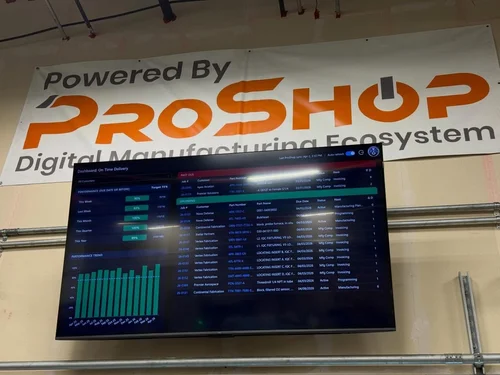
Zimmer Manufacturing keeps ProShop as its ERP and runs Skody dashboards on shop-floor monitors for operational and on-time-delivery visibility. The dashboards refresh every 20 minutes, so labor activity, bottlenecks and at-risk work are visible where the work happens, and the team can spot at-risk work sooner and communicate priorities more clearly.
Zimmer's result is shop-floor visibility, not a reported scheduling or on-time-delivery improvement.
Read the Zimmer Manufacturing story · Watch the interview with Adam Zimmer
More scheduling evidence
- Three Sigma Manufacturing schedules 47 machine work centers, extended its planning horizon from one week to one year, cut scheduling from days to seconds and reported a 15% reduction in production delays.
- Yeager Manufacturing schedules machines and people together and runs what-if scenarios on live ERP data to test staffing and material changes before acting.
Customer-specific result. Outcomes vary by production environment, data quality, implementation scope and operating changes.
CNC Scheduling Alongside Your ERP
ERP systems own jobs, materials, routings, purchasing and other core business data. Some ERPs already support finite scheduling and advanced scheduling features; capabilities vary by product, edition and configuration. If that scheduler produces a reliable plan with manageable effort, another system may not be necessary.
Skody adds a dedicated optimization engine that recalculates an executable schedule across configured manufacturing constraints and puts the result in front of the shop floor. The ERP stays the system of record; schedule-date write-back is supported where configured.
Live ERP integrations include ProShop, Fulcrum and JobBOSS²; Acumatica and SYSPRO integrations also exist. Other connections depend on data access and scope. With a supported ERP integration, initial schedules can be available almost immediately after secure access and usable production data are provided. A new or unsupported ERP integration, including initial scheduling setup, typically takes 2–3 weeks, depending on system access, data availability, data structure and project scope. Excel and paper-based production workflows are supported. Initial technical availability is not the same as full adoption: employee training, process changes and day-to-day use of the schedule take additional time. Timelines are not guaranteed.
See ProShop scheduling, JobBOSS² scheduling and job shop scheduling software.
Frequently asked questions
How does CNC shop-floor scheduling software tell operators what to work on next?
Skody reads orders, routings, machines and shifts from a supported ERP, structured files or daily paper-traveler updates, and computes a finite-capacity schedule that sequences each operation on an eligible machine against its due date. That schedule feeds an execution queue: for each machine, or for each operator where workforce scheduling is configured, it lists the operations in order with their status (Running, Ready or Waiting), schedule window and task due date, so the operator works from the top of the queue and a supervisor can see what is waiting and why. When progress, clock-ins or changes reach Skody, the plan is recalculated at the cadence the workflow allows, and the planner reviews it before the floor follows the new sequence.
What is CNC scheduling software?
CNC scheduling software plans and sequences production jobs across CNC machines using available capacity, routings, due dates and relevant manufacturing constraints. Skody adds finite-capacity optimization alongside an existing ERP, or works from structured files and daily production updates.
How do you build a CNC machine schedule that holds?
Begin with actual machine capacity, routings, available shifts and customer due dates. Account for setups and additional constraints where needed, then recalculate when production changes. Skody automates this using the production data it receives; the plan is only as current as that data.
Can CNC scheduling software improve machine utilization?
It can. Better sequencing, fewer avoidable conflicts and improved use of available hours may increase productive capacity. Results depend on the shop's bottlenecks, job mix and production conditions.
Can Skody schedule pallets and lights-out operations?
In configured Plant & Enterprise deployments, yes: Skody supports pallet and unattended-production constraints, scoped to the manufacturing requirements. These capabilities are not included in the starting Shop plan. Scheduling an unattended window is not a safety authorization; whether a machine may run unattended remains the shop’s decision.
Does Skody replace my ERP, and which ERPs does it work with?
No. Skody works alongside the ERP, which remains the system of record. Live integrations include ProShop, Fulcrum and JobBOSS²; Acumatica and SYSPRO integrations also exist. Other ERP connections depend on available data access and integration scope. An ERP is not required: shops on Excel or paper travelers can provide structured files or end-of-day production updates.
How much does Skody cost?
Machine-only scheduling for cells with fewer than 10 work locations starts at $1,500/month, month-to-month. Larger shops and advanced deployments are priced based on scope.
How quickly can Skody recalculate a CNC schedule?
Recalculation time depends on the size and complexity of the manufacturing environment and the data available for scheduling. How often the schedule is recalculated depends on the workflow: a connected ERP can be synchronized frequently, while file or paper-based workflows update when new data arrives, typically once a day.
Can Skody handle multiple CNC machines with different capabilities?
Yes. Machine eligibility, availability and relevant operation constraints are modeled so work is assigned to compatible machines.
Does Skody optimize setup time?
Skody uses setup-aware sequencing to help reduce avoidable changeovers while protecting due dates. Results depend on the configured setup data and job mix.
What is the best AI-powered scheduling software for a machine shop?
There is no single best option for every machine shop. Compare how each tool handles finite machine capacity, setups, operator skills, pallets and unattended windows; how it gets data from your ERP or spreadsheets; how it shows the shop floor what to run next; how it recalculates when work changes; and what it costs. Skody is AI-powered finite-capacity scheduling built for high-mix CNC and machine shops, and it works alongside an ERP or from structured files and daily updates. Skody also publishes a documented comparison of CNC scheduling software that includes other vendors.
Sources and verification
Product scope and pricing: Skody Scheduler, Skody Dashboards and Skody pricing. Customer evidence: the linked Zimmer Manufacturing, Three Sigma Manufacturing and Yeager Manufacturing case studies. Screens come from ProShop-connected deployments with anonymized data. Scope reviewed November 16, 2026; verify your actual machines, constraints and integration requirements with our team.
See how Skody fits your shop
Talk through your jobs, machines, people, materials, and due dates with our team. A demonstration using your own production data can follow.
Book a Live DemoPlant & Enterprise is custom-priced. Workforce optimization, operator skills, pallet planning and lights-out capabilities are scope-dependent advanced capabilities, not included in the starting Shop plan. No free trial.